To-dos · Habits · Expenses, free on iOS & Android

Lists you share.
Habits you keep.
Money you split.

Lion's Notes keeps your groceries, routines and budgets in one calm app. Plan a trip or the weekly shop together: up to 10 people can tick off the same list, live.

  • Free plan, no card
  • No ads
  • Works offline
  • 13 languages
Today's habits with progress counters
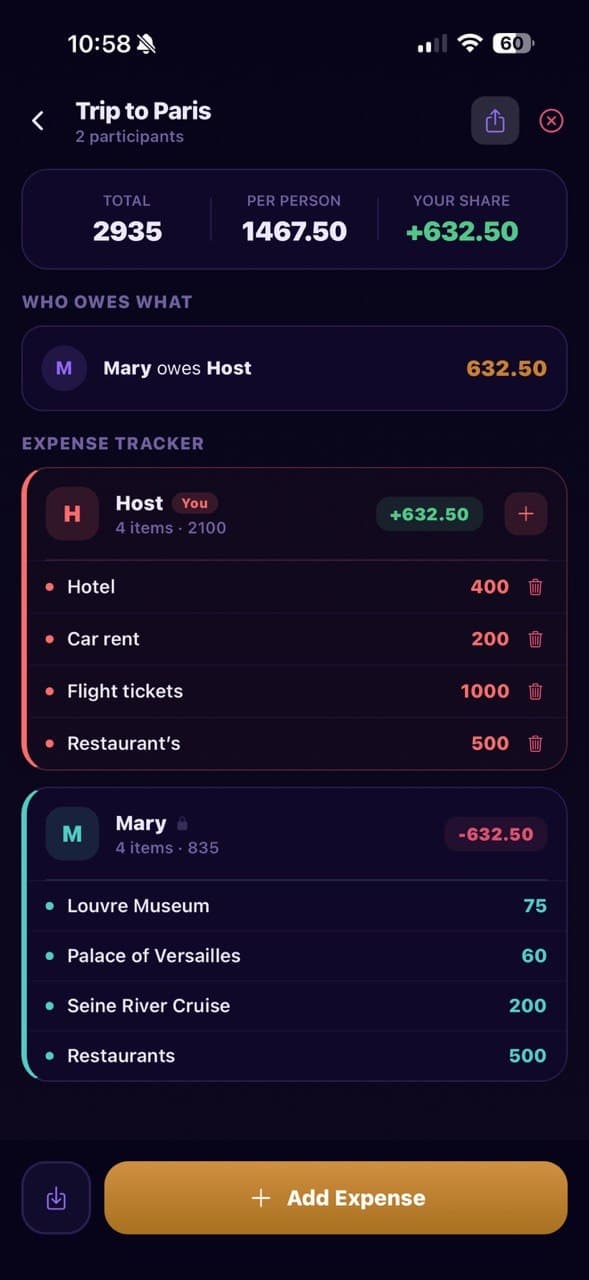
A shared trip budget showing who owes whom
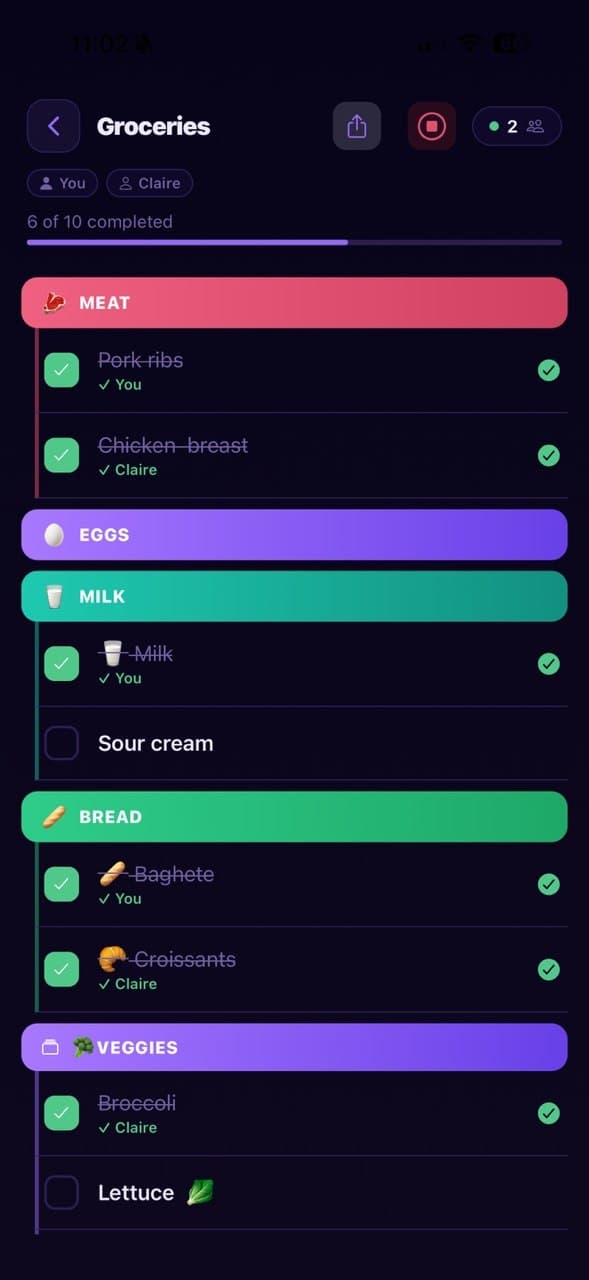
A grocery list two people are checking off together, live
CClaire checked Croissants Live · just now
Trip to ParisMary owes you 632.50

One app instead of four

Stop running your life across four apps.

The shopping list lives in one place, the habits in another, and who paid for dinner gets lost in the chat. Lion's Notes puts all of it on one home screen, shared with the people it's for.

  • A notes app
  • A habit tracker
  • An expense spreadsheet
  • Lists lost in a group chat
Lion's Notes

Lists, habits and expenses. One sign-in, one place, synced to everyone you share with.

What's inside

Built for the things you do together.

01Live sessions

Shop together. Nobody buys the milk twice.

Start a live session from any list and send the link. Everyone sees each tick the moment it happens, and who made it.

  • Up to 10 people in one session
  • Split Screen gives each person their own list, side by side
  • Every checked item shows who checked it

A Pro feature. Your first session of each type is free to try.
02Daily habits

Small habits. Visible progress.

Tick off today's routine, count glasses of water or pages read, and get a nudge at the time you choose.

  • Daily targets with counters, like 2 of 5 glasses
  • A reminder at the time you pick
  • A streak that grows every day you show up
  • Monthly stats with Pro
Today's habits with progress counters and reminders

03Expenses

Know exactly who owes whom.

Keep a list for daily spending, the household or a trip. Split a group trip and Lion’s Notes works out how everyone settles up.

  • Expense lists with categories, free
  • Split group costs and settle up in one line (Pro)
  • Spending breakdown by category (Pro)
A shared trip budget showing totals and who owes what

04Notes & checklists

Lists that stay tidy.

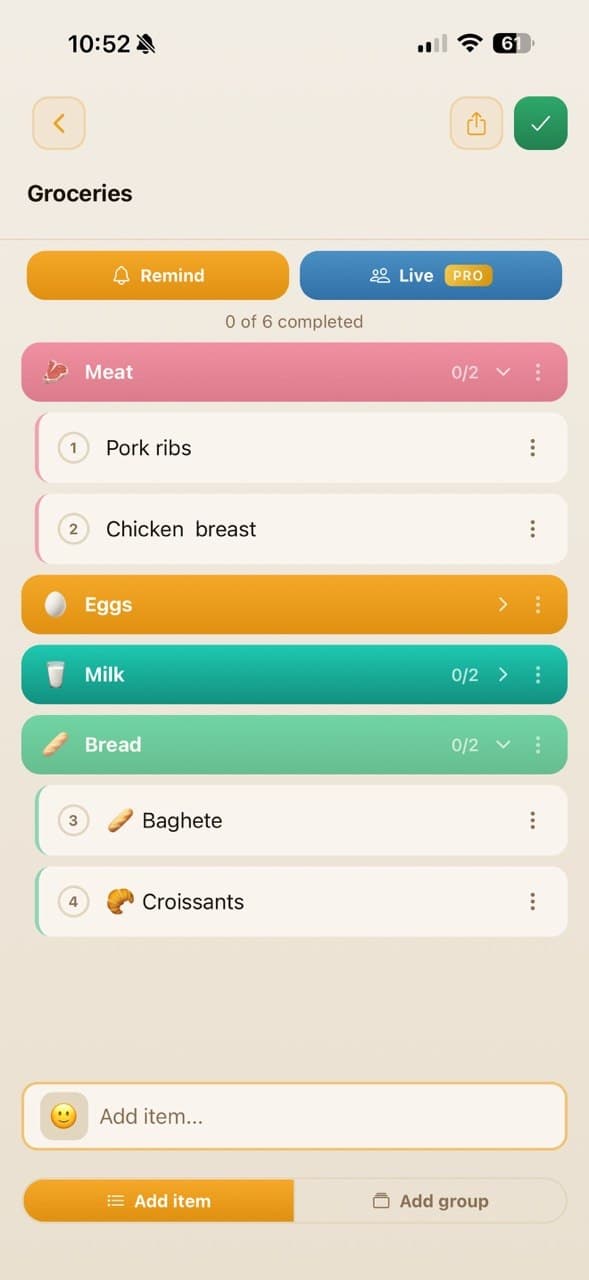
Group items by aisle, room or day, give each group an emoji, drag to reorder, and set a reminder so nothing slips.

  • Color groups with emoji
  • Drag-and-drop reordering
  • Reminders on any list, repeating with Pro
  • Share a list with a secure link
A grocery checklist grouped into Meat, Eggs, Milk and Bread

Make it yours

26 themes. 17 icons. All free.

From warm paper to deep midnight, with palettes people already love, like Nord, Gruvbox and Tokyo Night. Switch any time; nothing here sits behind Pro.

  • Classic

  • Midnight

  • Forest

  • Sand

  • Tokyo

  • Ocean

  • Candy

  • Graphite

  • Sunset

  • Nord

  • Amethyst

  • Rosewood

  • Sage

  • Lilac

  • Champagne

  • Mauve

  • Spring

  • Cyber

  • Gruvbox

  • Sovereign

  • Washi

  • Espresso

  • Paper

  • Onyx

  • Rosé

  • Mocha

The details

The small things, done right.

Works offline

Your lists, habits and expenses are kept on your phone too. Edit them on a plane or in a basement shop, and they sync on their own once you're back online.

Offline · 3 changes saved on phone Back online · synced

Guest mode

Try everything without an account or an email address. In guest mode it all stays on your phone.

Reminders

Set a reminder on any list or habit. One-off reminders are free; repeating ones come with Pro.

Private by design

No ads. We never sell your data or share it with advertisers, and it always travels encrypted.

Share with a link

Send a secure link to a list or a trip budget, and friends join from their own phone.

Speaks 13 languages

  • English
  • Español
  • Deutsch
  • Français
  • Italiano
  • Português
  • Română
  • Русский
  • Українська
  • हिन्दी
  • 日本語
  • 한국어
  • 中文

Pricing

Free to start. Pro when you need more.

The Free plan has no time limit and no ads. Pro adds room for more, plus live sessions and group expenses.

Billing period

Free

$0

No card, no time limit

  • Up to 3 notes & checklists
  • Up to 3 custom habits a day
  • 2 expense lists
  • All 26 themes & 17 app icons
  • Works offline
  • 13 languages
  • Guest mode — no account needed

Pro

14 days free

$19.99/year

≈ $1.67/mo · billed annually

Everything in Free, plus:

  • Up to 200 notes
  • Up to 50 custom habits a day
  • Up to 30 expense lists
  • Live sessions with up to 10 people
  • Split-screen sessions
  • Split group expenses
  • Monthly habit stats
  • Spending breakdown by category
  • Repeating reminders

Start the 14-day free trial inside the app, once per account. The store asks for a payment method but charges nothing during the trial. Cancel at least 24 hours before it ends and you pay nothing.

FAQ

Questions, answered.

Is the 14-day trial really free?

Yes. The trial runs through the App Store or Google Play, so the store asks for a payment method, but nothing is charged during the 14 days. Cancel at least 24 hours before it ends and you pay nothing; otherwise it renews as a paid plan. The trial is offered once per account. New accounts may also get a 7-day Pro pass that needs no payment method and simply ends on its own.

What happens to my data if I cancel Pro?

Nothing is deleted. Your account moves to the Free plan, and anything above the Free limits stays in the app, where you can view it, check items off, and delete it. Editing it or adding to it needs Pro. Delete down to the Free limit and everything unlocks again.

How does live collaboration work?

Start a live session from any list and share the link. Up to 10 people can join and see every change in real time. Split Screen puts everyone in one session with their own tasks, so you can compare progress side by side. Live sessions are a Pro feature, and Free accounts get one free try of each type.

Where is my data stored?

Your account data is stored with our cloud provider, Convex, and always travels over encrypted HTTPS. The app also keeps a copy on your phone so it works offline. We never sell your data or share it with advertisers. The Privacy Policy has the full details.

Does it work offline?

Yes. When you are signed in, the app keeps your notes, habits, and expenses on your phone, so you can open and edit them without internet. Your changes wait on the device and sync automatically once you are back online. A few things need a connection, such as adding a new habit, starting a live session, or buying Pro. In guest mode everything lives on your phone.

How do I restore my subscription on a new device?

Sign in with the same account used when purchasing (Google, Apple, or Email). Then go to Settings → Restore Purchases inside the app. Your subscription restores instantly.

How do I delete my account?

Go to Settings → Danger Zone → Delete Account inside the app. Everything is permanently deleted within 30 days. You can also email support@lionnotes.online with subject "Delete My Account — Lion's Notes".

Still have a question? support@lionnotes.online

Start with today's list.

Groceries, a morning routine, a weekend away. Download Lion's Notes free and have it set up before the kettle boils.

  • Free plan, no card
  • Try it as a guest, no sign-up
  • Cancel Pro any time in the store